A screensaver clock for Mac and Apple TV
Clocks in Motion turns an idle Mac or Apple TV into kinetic art. Every minute, twenty-four small analog faces sweep into place to draw the time, and the display stays awake so the clock never stalls halfway through a move.
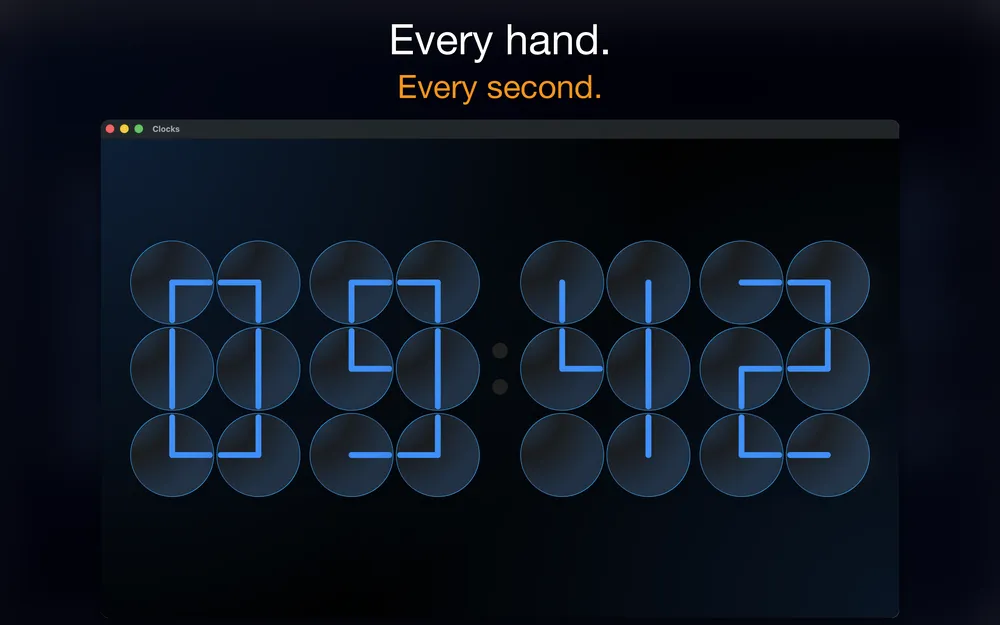
Mac
The macOS app is a full-screen desktop clock that keeps the display awake. Light and dark appearance follow your system, and a medium widget keeps the clock in view on your desktop. You can pick Blue, Green or Amber hands and choose between 12-hour and 24-hour time.
Apple TV
On Apple TV the app works as a full-screen clock and screensaver, which suits the biggest screen in the house. You can also send the clock from an iPhone to any Apple TV or AirPlay 2 display: open the app and tap the AirPlay icon.
Why a clock made of clocks
There is no font involved. Each digit is a three-by-two grid of real analog faces, and their hands point in whatever directions form the straight edges, corners and curves. It reads at a glance from across a room, and it moves just enough to be worth watching.
Get Clocks in Motion
One-time purchase, $0.99. No ads, no subscriptions.


